Pages

Simple Python Program to find Biggest number


a=int(input('Enter value for a :'))
b=int(input('Enter value for b :'))

op=str(input('Enter the operator :'))
if op in ["'addition","+", "sum"]:
    result=a+b
    print('Result is: %d' %result)
else:
    print('Invalid operation')

Simple Python Program to find Biggest number


a=int(input('Enter value for a :'))
b=int(input('Enter value for b :'))

op=str(input('Enter the operator :'))
if op in ["'addition","+", "sum"]:
    result=a+b
    print('Result is: %d' %result)
else:
    print('Invalid operation')

OBIEE Server procedure call to view the current cache contents


We can use call NQS_GetAllCacheEntries(); command to get all the cache entries available in server.

steps to use:

1. Login to analytics as user with admin role or weblogic.

2. Go to administration page.

3. Click on issue sql link.

4. call the command in issue sql box: call NQS_GetAllCacheEntries();


OBIEE Server procedure call to view the current cache contents


We can use call NQS_GetAllCacheEntries(); command to get all the cache entries available in server.

steps to use:

1. Login to analytics as user with admin role or weblogic.

2. Go to administration page.

3. Click on issue sql link.

4. call the command in issue sql box: call NQS_GetAllCacheEntries();


OBIEE Cache Management

Cache Management
Introduction
Cache is an essential feature for obtaining an optimized report and faster response time. However, when managed in an improper way, it will lead to stale data appearing in reports.  So this chapter explains the ways to monitor and manage cache for eliminating stale data and for improving performance.
  1. Business Challenge
  • Decision support systems running the report require a larger amount of database processing.
  • Frequent trips to back-end databases to satisfy query results can result in increased query response time and poor performance.
  1. Business Solution
The solution to the drawback is to employ OBI Server Query Cache
Oracle BI Server can be configured to maintain a disk-based cache of query result sets (query cache):
  • The server can save the results of a query in cache files and then reuse them later when a similar query is requested.
  • For subsequent times that a similar query is executed, the results are satisfied by the cache and not the database since it is processed only once for the initial time a query is executed.
  • Oracle BI Server can configure Oracle BI Server to maintain a local, disk-based cache of query sets (the query cache).
  • The query cache enables Oracle BI Server to satisfy many subsequent query requests without having to access back-end databases.
  • This reduction in communication costs can dramatically decrease query response time.
  1. Advantages of Caching
  • The unnecessary database processing can be eliminated since the pre-computed results are stored in a local cache.
  • The query performance is improved by fulfilling a query from the cache rather than searching through the database.
  • The network resources are conserved because the intermediate results do not have to come over the network to Oracle BI Server.
  1. Costs of Caching
  1. Disk Space
The query cache requires dedicated disk space. The amount of space depends on the query volume, the size of the query results sets, and the amount of disk space to be allocated to the cache. A high-reliability disk system should be exclusively used for caching in order to increase the performance.
  1. Administrative Tasks
There are a few administrative tasks associated with caching that result in caching costs. You need to set the cache persistence time for each physical table appropriately, knowing how often data in that table is updated. When the update frequency changes, you need to keep track of when changes occur and purge the cache manually when necessary.
  1. Keeping the Cache Up to Date
If the cache entries are not purged when the data in the underlying database changes, queries can potentially return results that are out of date.
For applications in which data is updated yearly or quarterly, it may be acceptable to keep stale data in the cache.
For applications in which data is updated frequently, it may be necessary to purge the cache more often. It is also possible to purge the entire cache as part of the extraction, transformation, and loading (ETL) process for rebuilding the data mart, making sure that there is no stale data on the cache.
  1. Architecture of Query Cache
The query cache consists of:
  1. Cache storage space
  2. Cache metadata
  3. Cache detection
A query cache is a facility that stores the results from queries. If a query is fulfilled by the results stored in the cache, it is called a  cache hit.
In the architecture depicted above, the process of accessing the cache metadata occurs very quickly. If the metadata shows a cache hit, the bulk of the query processing is eliminated, and the results are immediately returned to the user.
  1. Monitor and Manage Cache
Cache files always produce the same results, even after a database has been updated.
Issues with retaining cache files like not purging outdated caches can potentially return inaccurate results over time and consume disk space. Therefore, you need a cache management strategy to manage changes to the underlying databases and to monitor cache entries.
The choice of a cache management strategy depends on the volatility of the data in the underlying databases and the predictability of the changes that cause this volatility.
It also depends on the number and types of queries that comprise your cache, as well as the usage those queries receive.
Note: Cache won’t refresh if we refresh the database. It depends on the user queries. If the user make a query, it will hit the database first and not the cache.

OBIEE Cache Management

Cache Management
Introduction
Cache is an essential feature for obtaining an optimized report and faster response time. However, when managed in an improper way, it will lead to stale data appearing in reports.  So this chapter explains the ways to monitor and manage cache for eliminating stale data and for improving performance.
  1. Business Challenge
  • Decision support systems running the report require a larger amount of database processing.
  • Frequent trips to back-end databases to satisfy query results can result in increased query response time and poor performance.
  1. Business Solution
The solution to the drawback is to employ OBI Server Query Cache
Oracle BI Server can be configured to maintain a disk-based cache of query result sets (query cache):
  • The server can save the results of a query in cache files and then reuse them later when a similar query is requested.
  • For subsequent times that a similar query is executed, the results are satisfied by the cache and not the database since it is processed only once for the initial time a query is executed.
  • Oracle BI Server can configure Oracle BI Server to maintain a local, disk-based cache of query sets (the query cache).
  • The query cache enables Oracle BI Server to satisfy many subsequent query requests without having to access back-end databases.
  • This reduction in communication costs can dramatically decrease query response time.
  1. Advantages of Caching
  • The unnecessary database processing can be eliminated since the pre-computed results are stored in a local cache.
  • The query performance is improved by fulfilling a query from the cache rather than searching through the database.
  • The network resources are conserved because the intermediate results do not have to come over the network to Oracle BI Server.
  1. Costs of Caching
  1. Disk Space
The query cache requires dedicated disk space. The amount of space depends on the query volume, the size of the query results sets, and the amount of disk space to be allocated to the cache. A high-reliability disk system should be exclusively used for caching in order to increase the performance.
  1. Administrative Tasks
There are a few administrative tasks associated with caching that result in caching costs. You need to set the cache persistence time for each physical table appropriately, knowing how often data in that table is updated. When the update frequency changes, you need to keep track of when changes occur and purge the cache manually when necessary.
  1. Keeping the Cache Up to Date
If the cache entries are not purged when the data in the underlying database changes, queries can potentially return results that are out of date.
For applications in which data is updated yearly or quarterly, it may be acceptable to keep stale data in the cache.
For applications in which data is updated frequently, it may be necessary to purge the cache more often. It is also possible to purge the entire cache as part of the extraction, transformation, and loading (ETL) process for rebuilding the data mart, making sure that there is no stale data on the cache.
  1. Architecture of Query Cache
The query cache consists of:
  1. Cache storage space
  2. Cache metadata
  3. Cache detection
A query cache is a facility that stores the results from queries. If a query is fulfilled by the results stored in the cache, it is called a  cache hit.
In the architecture depicted above, the process of accessing the cache metadata occurs very quickly. If the metadata shows a cache hit, the bulk of the query processing is eliminated, and the results are immediately returned to the user.
  1. Monitor and Manage Cache
Cache files always produce the same results, even after a database has been updated.
Issues with retaining cache files like not purging outdated caches can potentially return inaccurate results over time and consume disk space. Therefore, you need a cache management strategy to manage changes to the underlying databases and to monitor cache entries.
The choice of a cache management strategy depends on the volatility of the data in the underlying databases and the predictability of the changes that cause this volatility.
It also depends on the number and types of queries that comprise your cache, as well as the usage those queries receive.
Note: Cache won’t refresh if we refresh the database. It depends on the user queries. If the user make a query, it will hit the database first and not the cache.

Creating OBIEE RPD Video Tutorial

Creating OBIEE RPD Video Tutorial

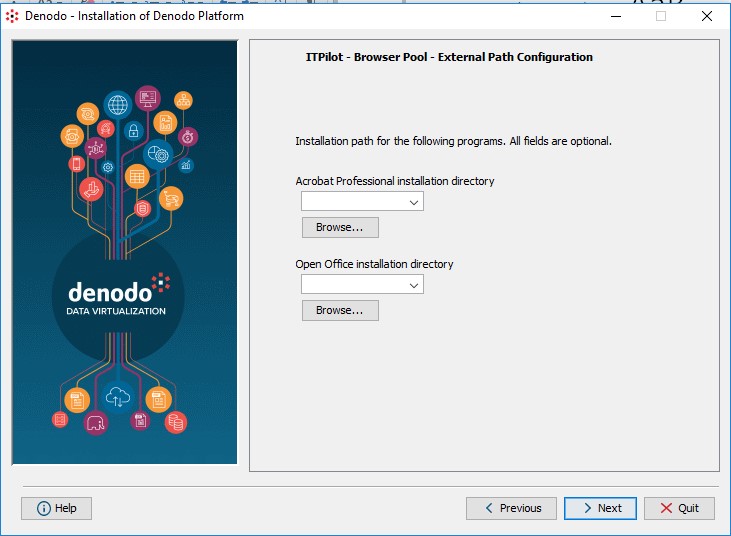
Denodo Installation Gudie


Download the latest version from the below link

Please post your questions regarding OBIEE and Denodo to prasad.alwayscool12@gmail.com.

we will get back you :)
Once you download the file.
Double click on it.
Click on Next

Accept the terms and license agreement.
Select the installation path and click Next.
select all three options as default to install and click Next.

Read the pre-requisition and click on Next.
 Select default values in this step and click Next

The next window shows the components to be installed, check the components and click Next 
Next windows shows the progress of installation.
Once the installation completes the Next button will enabled and click on Next

in the next window you can configure the shortcuts and users for the application, configure it and click on Next

Click on Done in the Next window and enjoy Denodo tool.

Denodo Installation Gudie


Download the latest version from the below link

Please post your questions regarding OBIEE and Denodo to prasad.alwayscool12@gmail.com.

we will get back you :)
Once you download the file.
Double click on it.
Click on Next

Accept the terms and license agreement.
Select the installation path and click Next.
select all three options as default to install and click Next.

Read the pre-requisition and click on Next.
 Select default values in this step and click Next

The next window shows the components to be installed, check the components and click Next 
Next windows shows the progress of installation.
Once the installation completes the Next button will enabled and click on Next

in the next window you can configure the shortcuts and users for the application, configure it and click on Next

Click on Done in the Next window and enjoy Denodo tool.

Change of color HTML

Change Background color my inputting color name in text field

Change of color HTML

Change Background color my inputting color name in text field

Informatica Architecture

Informatica ETL tool consists of following services & components.
  1. Repository Service – Responsible for maintaining Informatica metadata & providing access of same to other services.
  2. Integration Service – Responsible for the movement of data from sources to targets
  3. Reporting Service - Enables the generation of reports
  4. Nodes – Computing platform where the above services are executed
  5. Informatica Designer - Used for creation of mappings between source and target
  6. Workflow Manager – Used to create workflows and other task & their execution
  7. Workflow Monitor – Used to monitor the execution of workflows
  8. Repository Manager – Used to manage objects in repository


Informatica Domain

The overall architecture of Informatica is Service Oriented Architecture (SOA).

Informatica Domain is the fundamental administrative unit in Informatica tool
It is a collection of nodes and services. Further, this nodes and services can be categorized into folders and sub-folders based on the administration requirement.

Node is a logical representation of a machine inside the domain. Node is required to run services and processes for Informatica.

You can have multiple nodes in a domain. In a domain, you will also find a gateway node.

The gateway node is responsible for receiving requests from different client tools and routing those requests to different nodes and services.

There are two types of services in Domain

Service Manager: Service manager manages domain operations like authentication, authorization, and logging. It also runs application services on the nodes as well as manages users and groups.

Application Services: Application service represents the server specific services like integration service, repository service, and reporting service. These services run on different nodes based upon the configuration.

PowerCenter Repository

PowerCenter repository is a relational database like Oracle, Sybase, SQL server and it is managed by repository service. It consists of database tables that store metadata.

There are three Informatica Client tools available in Informatica Powercenter. They are Informatica
  • Designer
  • Workflow Monitor
  • Workflow Manager

These clients can access to the repository using repository service only.

To manage a repository there exists an Informatica service called Repository Service. A single repository service handles exclusively only one repository. Also, a repository service can execute on multiple nodes to increase the performance.

The repository services use locks on the objects, so multiple users cannot modify the same object same time.

You can enable version control in the repository. With the version control feature, you can maintain different versions of the same object.

Objects created in the repository can have following three state
  • Valid: Valid objects are those objects whose syntax is correct according to Informatica. These objects can be used in the execution of workflows.
  • Invalid: Invalid objects are those who does not adhere to the standard or rules specified. When any object is saved in Informatica, it is checked whether its syntax and properties are valid or not, and the object is marked with the status accordingly.
  • Impacted: Impacted objects are those whose child objects are invalid. For example in a mapping if you are using a reusable transformation, and this transformation object becomes invalid then the mapping will be marked as impacted.

Featured post

Snowflake - Creating warehouse in Snowflake

Creating warehouse Login to Snowflake and click on warehouse and click on Create fill the necessary details and click Finish We can also c...